AIGIS

Public safety operations platform

Run field response and command in one system.

Track units, dispatch missions, exchange operational messages, and use broadband push-to-talk in Field and OPS. Manage responder readiness, accountability, and service history in Command.

AIGIS FieldAIGIS OPSAIGIS Command

Mobile response · Desktop operations · Unified command

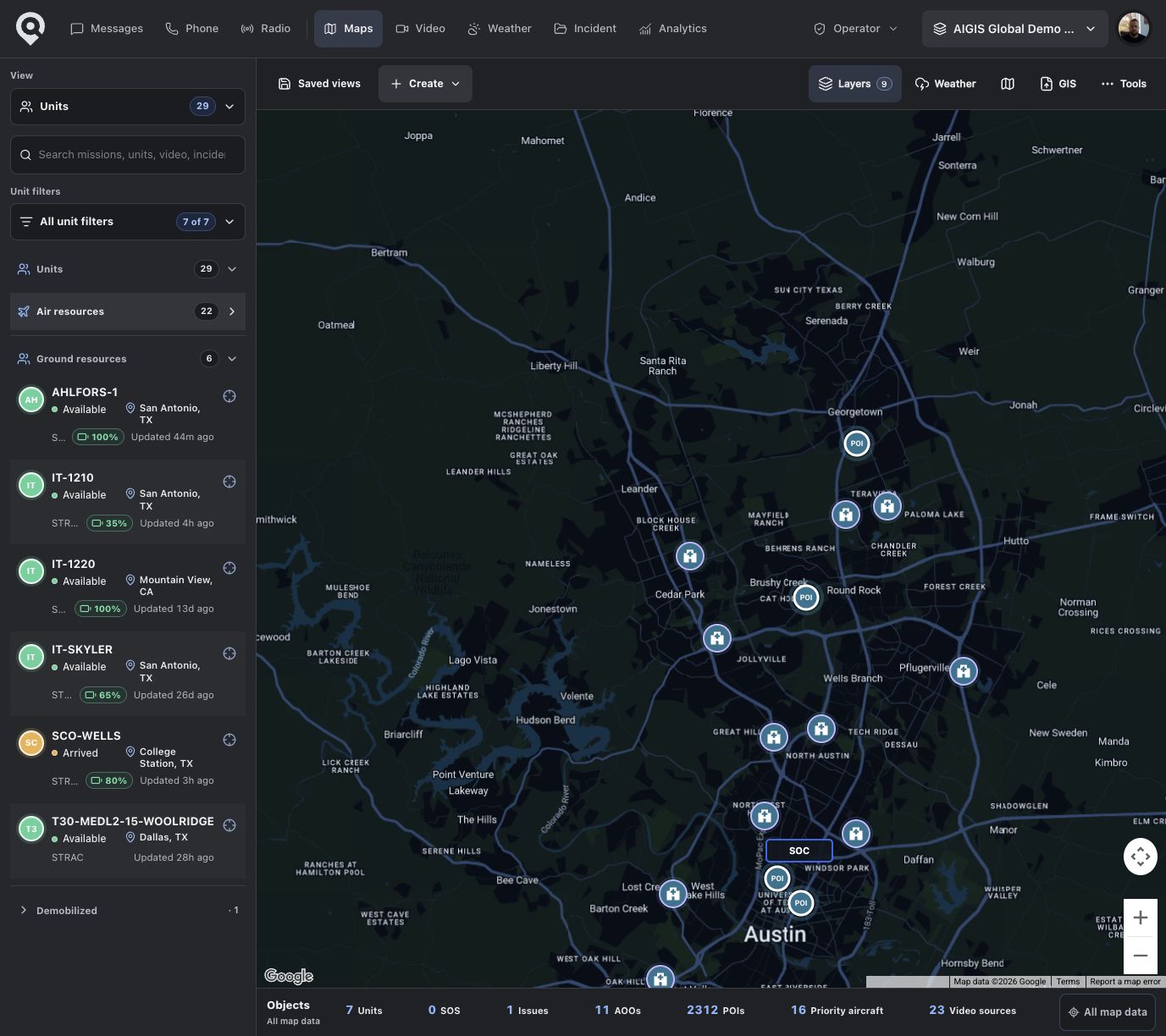
AIGIS OPS map workspace for unit tracking and operational coordination
AIGIS Field map showing storm conditions and responding units

Field for responders. OPS for coordinators.

AIGIS Field runs on iOS and Android. AIGIS OPS gives dispatchers and command posts a larger desktop workspace on macOS and Windows.

iOS · Android

AIGIS Field

Responders can create missions, share location, update unit status, message teams, and use push-to-talk from iOS or Android.

  • Create missions
  • Share unit location
  • Update status
  • Message teams
  • Use push-to-talk
AIGIS Field map showing weather, unit locations, and an incident operating area
macOS · Windows

AIGIS OPS

Use a larger desktop workspace for dispatch, maps, messaging, radio, history, and responder identity.

  • Dispatch workspace
  • Multi-pane messaging
  • Live operations map
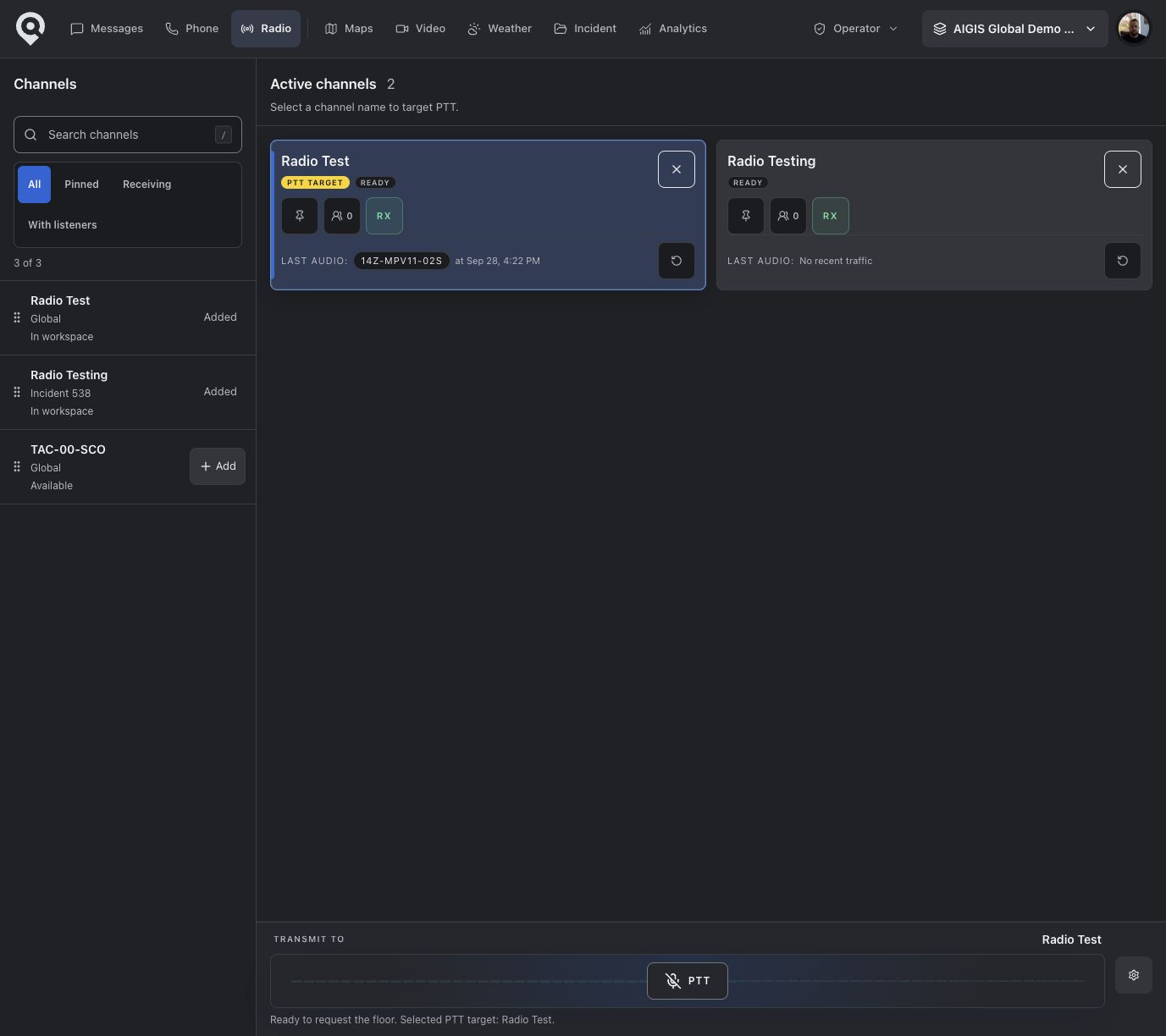
  • Radio channel control
  • Incident activity
AIGIS OPS dispatch workspace with units, missions, map context, and operational navigation

Field and OPS share the same incident context while keeping the interface focused on the work each role owns.

Get Field and OPS
AIGIS Field unit-status controls
Live Operations

Unit tracking without the CAD wall.

Keep a simplified, map-first operating picture of responders, missions, aircraft, hazards, and the unit actions command needs next.

Unit position and health

See location freshness, accuracy, movement, heading, speed, mission status, and tracking health.

Weather intelligence

Layer thunderstorms, lightning, tropical tracks, fire conditions, radar, and public weather alerts over the operation.

Aircraft awareness

Bring aircraft tracks, emergency squawks, classifications, and temporary flight restrictions into the map.

Power-outage awareness

View power-outage conditions alongside weather, fire, aircraft, units, and missions so command can see affected areas in operational context.

Use the operational layers that matter to the incident, then filter back to a clear unit and mission picture.

Explore map & unit tracking
AIGIS

AI assistance appears where the incident work already happens.

AI drafts the brief. Operators make the call.

AIGIS can summarize supported incident messages, flag user-defined watch terms, and research weather conditions. Operators review every result before acting.

Incident briefings

Summarize loaded, visible thread activity. Highlight key updates, unmet needs, and suggested next actions.

Watch rules

Surface likely matches from incoming messages while the client is running.

Weather decision support

Research weather context inside OPS when the capability is enabled for the organization.

Availability varies by surface, permissions, and provider configuration. AI summaries are disabled for encrypted direct messages.

Explore supported intelligence workflows
Operational Messaging

Message for the operation, not around it.

Coordinate channels, groups, direct conversations, replies, tactical responses, media, polls, locations, issues, and offline delivery with the incident close at hand.

Trusted text direct messages in the packaged AIGIS OPS desktop app can be end-to-end encrypted. This claim does not extend to channels, groups, attachments, browser sessions, or every AIGIS conversation.

Explore operational messaging
AIGIS OPS command channel showing critical acknowledgement and operational briefing messages

Messaging, compared carefully.

A compact preview based on current product behavior and publicly available vendor documentation.

View the cited comparison

Direct and group messaging

AIGIS
Included
Evertel
Included
GroupMe
Included

Critical or priority communication

AIGIS
Limited
Evertel
Included
GroupMe
Limited

Explicit operational acknowledgements

AIGIS
Included
Evertel
Not publicly documented
GroupMe
Not publicly documented

Incident-linked context

AIGIS
Included
Evertel
Included
GroupMe
Not publicly documented

Offline send queue and retry

AIGIS
Included
Evertel
Limited
GroupMe
Not publicly documented

Published encryption coverage

AIGIS
Limited*
Evertel
Included†
GroupMe
Not publicly documented

* AIGIS: trusted text DMs in the packaged OPS app only. † Evertel: the vendor publishes an end-to-end encryption claim; procurement validation is still required. “Not publicly documented” is not the same as “not available.”

AIGIS OPS radio channels, listeners, replay, and push-to-talk controls
AIGIS Field broadband push-to-talk channels
Interoperable Radio

Broadband PTT, connected to conventional radio.

Use push-to-talk in Field and OPS, then bridge selected channels through RoIP so app users and conventional radio users can communicate.

AIGIS supports major RoIP gateways, including Vocality, JPS, and other major RoIP devices. Gateway configuration and acceptance testing are completed for each deployment.

How the radio path connects

  1. AIGIS Field + OPS
  2. Broadband PTT
  3. AIGIS RoIP bridge
  4. RoIP gateway
  5. Conventional radio
Explore interoperable radio
AIGIS Dispatch

Create, assign, and track missions.

Responders can create missions in Field when policy allows. Operators assign units, update status, and review routes in OPS.

AIGIS Dispatch showing units, mission status, map context, and assignment actions
Create and take it
Assign from OPS
Configurable statuses
Unit recommendations
Route and ETA context
Explore AIGIS Dispatch
AIGIS Command

Prepare responders and retain incident history.

AIGIS Command maintains identity, qualifications, assignments, deployments, and recorded participation in a browser-based workspace.

Explore People & Service History

Objective responder history

Maintain current qualification records alongside incident assignments, deployments, worked time, and recorded participation.

  • Credentials and qualifications
  • Assignments
  • Deployments
  • Incident participation

Keep factual service history connected to the incident record that produced it.

Review AIGIS with your incident workflow.

We'll show Field, OPS, and Command using your unit structure, mission process, and radio environment.