AIGIS
Operational messaging

Incident messaging with clear response status.

Field and OPS support incident channels, direct and group conversations, replies, operational shares, and acknowledgement tracking.

Field · iOS and AndroidOPS · macOS and Windows
AIGIS OPS · Operational messaging
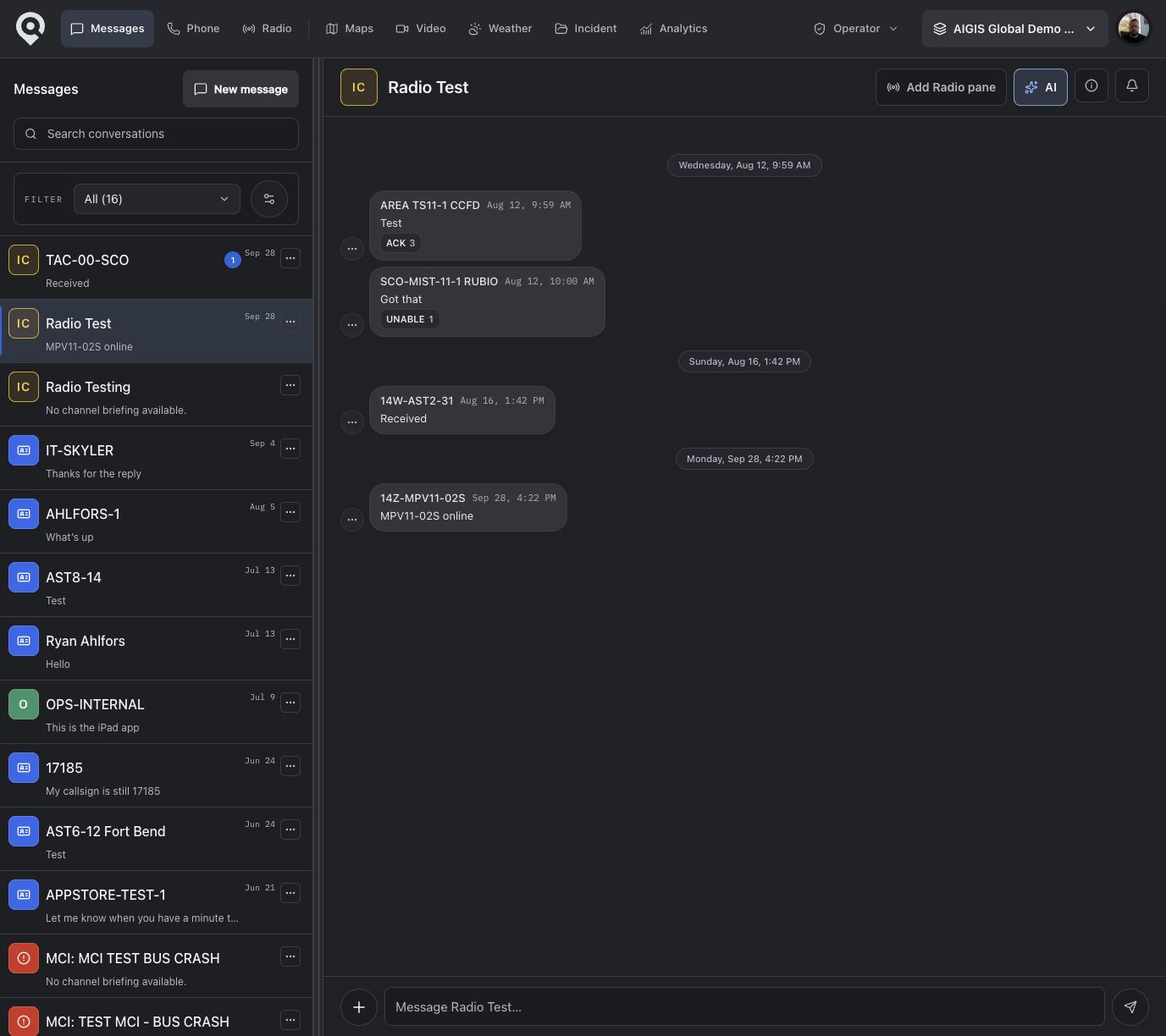
AIGIS OPS command channel with a priority acknowledgement request, scheduled operational briefing, and incident update
AIGIS Field messaging inbox with incident channels, critical messages, and unread state

AIGIS OPS uses deterministic fictional data. The separate AIGIS Field inbox has been screened to exclude visible personal identifiers; the two views do not depict one synchronized incident.

AIGIS Field

iOS and Android

Send the field update where the work happens.

Keep incident channels, direct and group conversations, attachments, tactical responses, and operational shares available on the device responders already carry.

  • Incident channels, groups, and direct conversations
  • Photos, video, documents, links, and locations
  • Tactical responses, polls, and operational shares
  • Queued outbound work through connectivity gaps

AIGIS OPS

macOS and Windows

Coordinate message traffic without losing the incident.

Give coordinators more room to move between conversations, create structured updates, review response state, and keep communication close to the active operation.

  • Multi-pane conversation and incident context
  • Critical updates, events, reminders, issues, and places
  • Delivery, read, unread, and acknowledgement state
  • Owner and moderator roles with lock and reopen controls
  • Conversation and shared-content retrieval

Message formats

Choose the format the work requires.

Use regular conversation for updates. Use priority or critical messages when you need an explicit operational response.

Conversation

Send text, reply in context, forward eligible plaintext messages, and use tactical reactions. Pins remain local to the device.

Action required

Raise a critical or priority message and ask for an explicit operational response instead of treating a reaction as confirmation.

Coordination

Polls work across Field and OPS. Priority, reminder, and event formats are available per client while their shared format is being unified.

Operational context

Attach an issue, place, or location so recipients can open the related incident detail.

Structured follow-through

Know who saw it. Know how they answered.

Delivery and read state answer part of the question. Operational acknowledgements let a responder say what the request means for the work ahead.

ACK
Received and understood
Confirm
Requested action confirmed
Unable
Cannot complete as requested
Issue
A blocking problem is present
Clarify
More direction is needed
AIGIS OPS · Command channel
AIGIS OPS showing an action-required message with acknowledgement counts and a scheduled briefing

11:10

Sent

11:10

Delivered

11:13

Read

18 pending

Acknowledgement

#COMMAND

Regional Flood Response

AIGIS OPS
Gate B access is blocked. Use the east service road until the primary route is cleared.

Issue · Access route blocked

Place
Gate B
Location
Updated pickup point
Follow-up
Logistics clearing the route
Message COMMAND…

Incident-native context

Attach the reason the message matters.

Share the file, issue, place, or location with the message so responders do not have to reconstruct the operational context from a separate app or an unstructured thread.

FileAttachmentIssuePlaceLocationForward

Retrieval and handoff

Find the operational trail again.

Keep key conversation and shared-content context available for the next decision, the next shift, or the next person joining the work.

Current search covers inbox, latest-message, and shared-content retrieval. It is not unrestricted full-history search.

Return to the conversation

Search the inbox and recent conversation state without scanning every active thread.

Review shared content

Bring media, files, links, and shared locations back into view from the conversation.

Keep key context visible

Keep a local, device-specific pin on information that should remain easy to find during a busy thread.

Stay connected to the work

Keep incident, mission, unit, issue, place, and location context close to the message when available.

AIGIS
AI-assisted. Operator reviewed.

Catch up, hand off, and track open actions.

When enabled, AIGIS OPS can summarize an eligible plaintext thread, draft a handoff, identify open actions, prepare follow-up text, and watch for terms the operator defines.

Explore supported intelligence workflows

Eligible plaintext thread

Regional Flood Response · #COMMAND

Operator review required

Brief

Catch up on current thread context

Handoff

Draft continuity for the next shift

Open actions

Identify unresolved follow-through

Status

Build a current operational snapshot

Follow-up

Prepare the next message for review

Alert rules

Watch for personal conditions

AI summaries are disabled for encrypted direct messages. Generated output requires operator review. Availability depends on configuration and permissions.

Encryption scope

Know which messages are end-to-end encrypted.

End-to-end encryption currently covers trusted, text-only direct messages in the packaged AIGIS OPS desktop app.

Current AIGIS end-to-end encryption scope

Trusted, text-only direct messages in the packaged AIGIS OPS desktop app.

Outside the current end-to-end claim

Channels, group conversations, attachments, browser sessions, AIGIS Field, and any conversation that does not meet the trusted-device requirements.

Validate during procurement

Confirm required encryption coverage, retention, records, audit, device management, and compliance controls against the deployed configuration and agency policy.

Connectivity gaps

Keep outbound work moving.

When connectivity drops, supported drafts and outbound work can remain queued locally and retry after the connection returns. The interface keeps queued state visible so a responder does not have to guess whether an update was sent.

  1. 01ComposeCreate the update while the operational context is still current.
  2. 02QueueRetain supported outbound work locally while the connection is unavailable.
  3. 03RetryResume delivery after connectivity returns and reflect the resulting message state.

Compare messaging and incident coordination.

Compare core chat capabilities, acknowledgement workflows, and platform coverage for field and command teams.

View all 21 capabilities
Direct and group messaging
AIGIS
Included
Genasys Evertel
Included
GroupMe
Included
Critical or priority communication
AIGIS
Limited
Genasys Evertel
Included
GroupMe
Limited
Explicit operational acknowledgements
AIGIS
Included
Genasys Evertel
Not publicly documented
GroupMe
Not publicly documented
Incident-linked context
AIGIS
Included
Genasys Evertel
Included
GroupMe
Not publicly documented
Offline send queue and retry
AIGIS
Included
Genasys Evertel
Limited
GroupMe
Not publicly documented
Published encryption coverageValidate during procurement
AIGIS
Limited

End-to-end encryption is currently limited to trusted, text-only direct messages in packaged AIGIS OPS.

Genasys Evertel
Included

The vendor publishes an end-to-end, military-grade encryption claim and a government-use-only cloud claim.

GroupMe
Not publicly documented

The reviewed official materials do not publish message-encryption coverage comparable to these claims.

Based on product review and official vendor materials as of July 25, 2026. Statuses describe documented scope, not a score.

See your incident messaging workflow in AIGIS.

Request Field and OPS access for your channel structure, responder roles, priority-message flow, acknowledgement requirements, and connectivity conditions.