AIGIS
Interoperable radio

Put the radio in more responders’ hands.

AIGIS Field and AIGIS OPS provide broadband push-to-talk over IP. Selected channels can connect to conventional radio through major RoIP gateways, including Vocality and JPS.

Field · iOS and AndroidOPS · macOS and Windows
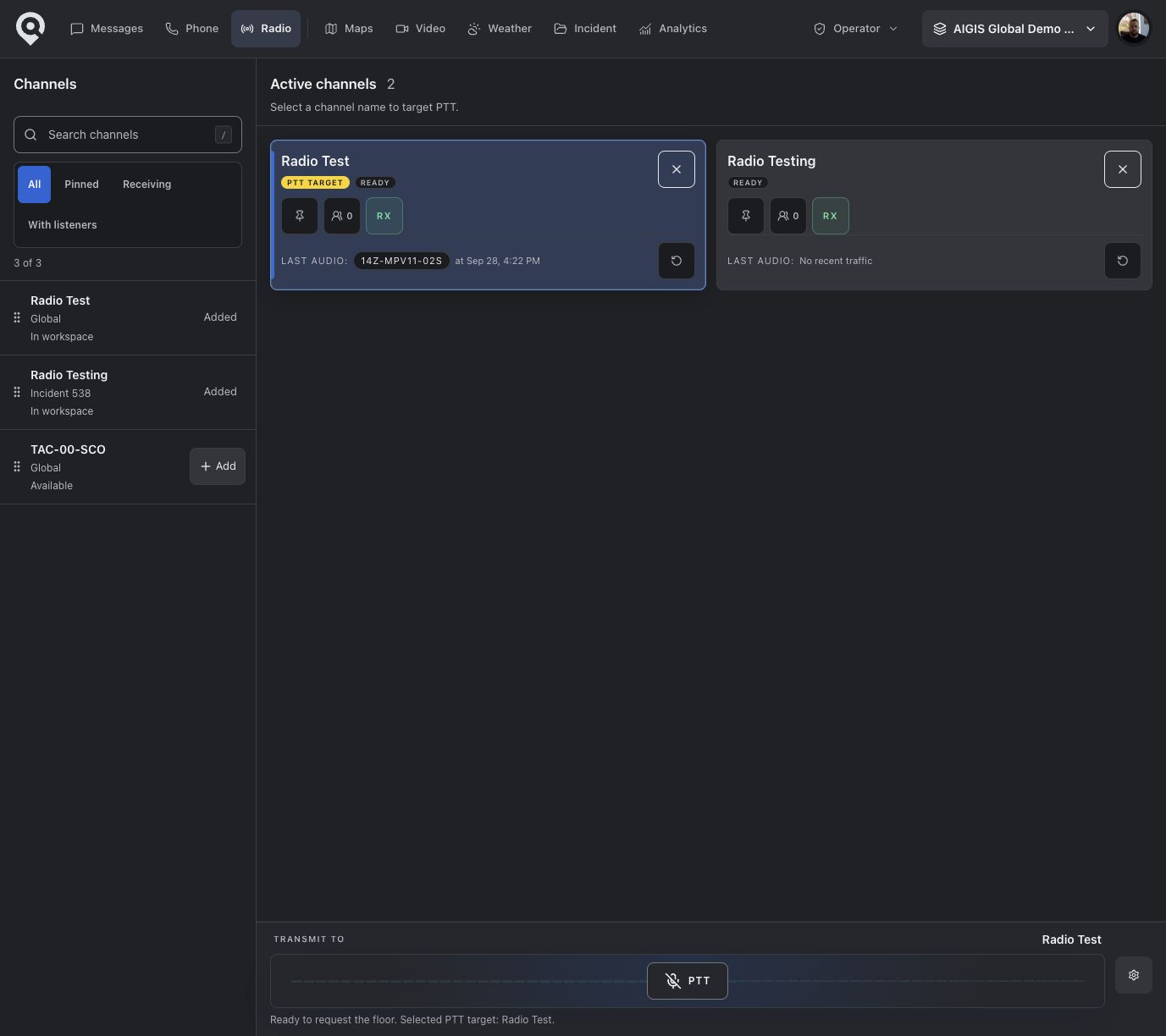
AIGIS OPS · Radio workspace
AIGIS OPS showing radio channels, a selected transmit target, receive controls, listeners, push-to-talk, and recent traffic
Representative AIGIS Field radio view showing broadband push-to-talk channels
The AIGIS OPS view uses deterministic fictional data. The separate released AIGIS Field capture has been screened to exclude visible personal identifiers; the two views do not depict one synchronized channel.

AIGIS Field

iOS and Android

Put the incident channel in responders’ hands.

Use press-and-hold PTT from the same mobile experience as missions, maps, unit status, and operational messaging.

  • Monitor multiple subscribed voice channels
  • Keep one unmistakable transmit target
  • See connected listeners and current speakers
  • Receive clear waiting, on-air, busy, and retry feedback

AIGIS OPS

macOS and Windows

Monitor and transmit from AIGIS OPS.

Keep radio channels beside maps, missions, and messages, with desktop controls for an operating position.

  • Pin channels and control receive independently
  • Select and test the operating microphone
  • Use press-and-hold or a keyboard PTT control
  • Review recent traffic when recording is enabled
Channel control

Choose where to transmit without changing what you hear.

Field and OPS can monitor several subscribed channels while keeping one transmit channel selected.

Transmit

One target stays clear.

Selecting a channel changes where the next transmission goes. It does not silently change the receive state of other channels.

Receive

Listen where the operation requires.

Keep RX on for multiple subscribed channels and turn individual channels off when they should leave the listening mix.

Presence

Know who is on the channel.

See who is connected and who is speaking. Channel presence does not replace personnel accountability.

Floor control

The channel grants the floor before audio is sent.

AIGIS requests permission to transmit when the operator presses PTT. Audio starts after the floor is granted and stops when PTT is released.

  1. 01

    Press

    The responder presses and holds PTT on the selected channel.

  2. 02

    Request

    AIGIS asks the channel service for permission to transmit.

  3. 03

    Transmit

    Audio publishes only after the floor is granted and connected.

  4. 04

    Release

    Releasing PTT clears the floor for the next transmission.

Recent traffic

Replay recent radio traffic.

When recording is enabled for a channel, authorized users can find recent traffic by speaker, time, and duration.

Replay availability and retention depend on deployment settings and agency policy.

Speaker

Identify the participant associated with the recorded channel traffic.

Time and duration

Use recorded time and clip length to find the transmission that matters.

Authorized replay

Open recent traffic through a short-lived link when policy and configuration allow it.

RoIP interoperability

Connect AIGIS push-to-talk to existing radio systems.

Field and OPS use broadband PTT over IP. A configured RoIP gateway can bridge selected AIGIS channels to a conventional radio system.

The bridge lets app-based PTT and an existing radio system share selected traffic. This is not PSTN dialing, offline voice, or universal radio-network compatibility.

  1. AIGIS Field + OPS

    Responder and operations clients

  2. Broadband PTT

    Authenticated voice channel over IP

  3. AIGIS RoIP bridge

    Optional, configured media bridge

  4. RoIP gateway

    Vocality, JPS, and other major RoIP devices

  5. Conventional radio

    Existing radio network

The RoIP bridge, gateway, and conventional-radio leg are optional and configured for the specific deployment.

Gateway support

Supports major RoIP gateways.

AIGIS supports major RoIP gateways, including Vocality, JPS, and other major RoIP devices.

Gateway configuration and acceptance testing are completed for each deployment.

Deployment path

Start with broadband PTT. Add RoIP where you need it.

Field and OPS put push-to-talk on responder and coordinator devices. Conventional radio connections are configured and tested for each deployment.

  1. 1. Define channels and access

    Set the incident scope, voice-enabled channels, and the people permitted to publish and receive.

  2. 2. Equip Field and OPS

    Sign responders and coordinators into the clients they already use for the rest of the operation.

  3. 3. Connect the optional radio path

    Map selected channels to a supported RoIP gateway when conventional radio users need to participate.

  4. 4. Commission and acceptance-test

    Validate network, TLS, codec, PTT signaling, audio levels, channel mapping, and RF behavior for the actual deployment.

Operational feedback

See when a channel is busy, offline, or unavailable.

AIGIS shows whether a channel is connecting, waiting, busy, or unavailable so operators know why they cannot transmit.

Connectivity lost

PTT remains unavailable without an IP connection. Subscribed receive rooms use bounded reconnect attempts after transient loss.

Channel occupied

Waiting, queued, busy, preempted, and timeout states make floor contention visible instead of leaving the operator guessing.

Microphone unavailable

The client blocks transmission and surfaces permission or device state before audio is published.

Receive changed

Each channel keeps its own RX state so an operator can see what is in the listening mix and what is not.

OPS keyboard PTTAuthenticated, channel-scoped accessBounded reconnect behavior
Field · OPS · Optional RoIP

Bring the radio path into your operation.

Start with broadband PTT, then evaluate conventional-radio interoperability against your gateway, network, and RF requirements.